If you’ve ever asked yourself, “Why aren’t more people buying from my website?” — you’re not alone. The answer often comes down to one key idea: Conversion Rate Optimization (CRO).
Conversion Rate Optimization is all about getting more of your visitors to take action—whether that’s buying a product, signing up for a newsletter, or booking a call. And the good news? It doesn’t require a bigger ad budget—just a smarter strategy.
In this post, we’ll break down what CRO is, how it works, and how the Conversion Rate Checklist from The Good Fellas Agency can help you start making real improvements to your website today.
What Is Conversion Rate Optimization (CRO)?
Conversion Rate Optimization (CRO) is the process of improving your website so more visitors take a desired action—like making a purchase or filling out a form. The goal is to increase the percentage of users who convert, without needing to increase your traffic.
Why Does CRO Matter?
🔄 It helps you get more value from the traffic you already have
✅ It improves the user experience and builds trust
🌊 It can lead to significant sales growth with small tweaks
Imagine you’re paying for ads, but only 2% of visitors buy something. If you can raise that to 4%, you’ve doubled your revenue without spending more on ads. That’s the power of CRO.
What Is a Good Conversion Rate?
A “good” conversion rate depends on your industry, traffic source, and type of offer. But for most small business websites:
1% to 3% is common
4% to 5% is above average
10% or more means your funnel is highly optimized
The key is to track your current rate and focus on improving it over time.
To help you do that, our Conversion Rate Checklist gives you the exact steps to identify weak points in your funnel and fix them fast.
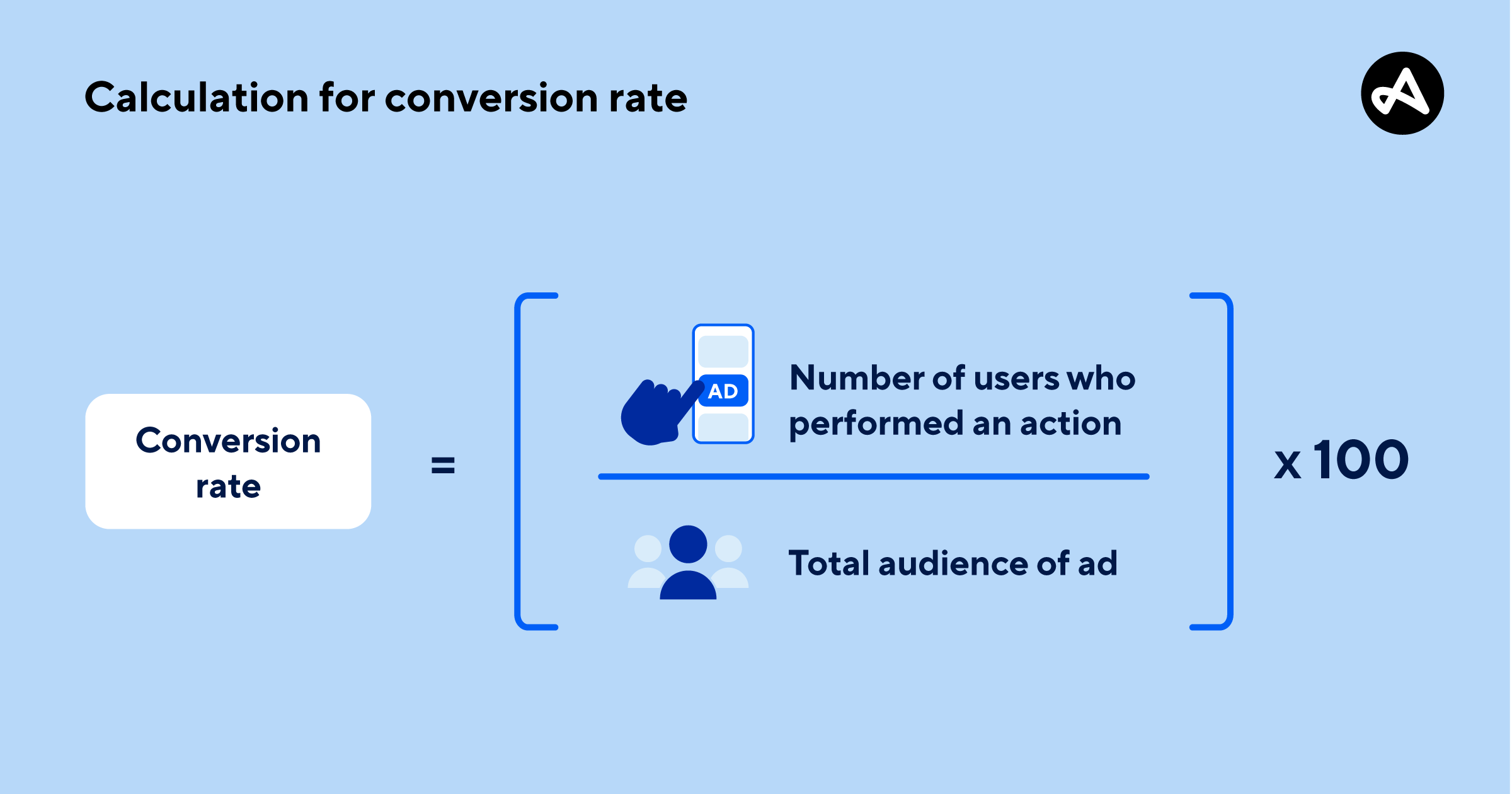
How Do You Calculate Conversion Rate?
Use this simple formula:
(Number of Conversions ÷ Total Visitors) × 100 = Conversion Rate (%)
Example: If you had 1,000 visitors and 50 people bought a product, your conversion rate is (50 / 1000) × 100 = 5%.
Use tools like Google Analytics or built-in Shopify/WooCommerce dashboards to track this metric.
What Impacts Conversion Rate?
Several factors affect how well your website converts:
Page speed — slow sites lose customers fast
Mobile-friendliness — most users are on phones
Clarity of your message — visitors need to know exactly what you offer
Trust signals — reviews, testimonials, security badges
Call-to-action buttons — clear, bold, and benefit-focused
These are just a few of the 25+ elements included in the Conversion Rate Checklist, which covers design, copy, behavior tracking, and lead flow improvements.
What’s Inside the Conversion Rate Checklist?
The Conversion Rate Checklist is a tactical workbook created by The Good Fellas Agency to help small business owners:
Mind Your Business Newsletter
Business news shouldn’t put you to sleep. Each week, we deliver the stories you actually need to know—served with a fresh, lively twist that keeps you on your toes. Stay informed, stay relevant, and see how industry insights can propel your bottom line.
Subscribe to Mind Your Business
Audit their current site
Find hidden drop-off points
Here are some of the areas it covers:
Page-Level Optimization
Do your headlines clearly say what you do?
Are your call-to-action buttons above the fold?
Trust & Clarity Signals
Do you show social proof (like testimonials or logos)?
Are your guarantees and refund policies easy to find?
Form Optimization
Are your forms short and easy to complete?
Do you explain why you need each piece of information?
Behavior Tracking
Are you using tools like Hotjar or GA4 to spot drop-off points?
Do you track user paths to see where they get stuck?
Whether you’re a coach, ecommerce owner, or local service provider, this checklist helps you take a focused approach to improving your website performance.
When Should You Focus on CRO?
Not sure if it’s the right time to improve your conversion rate? These common situations are clear signs that CRO could make a big difference in your business results.
You’re Getting Traffic but Not Enough Sales
If people are visiting your site but not buying, you likely have a conversion gap. CRO helps identify friction points and optimize the path to purchase so you turn more visitors into paying customers.
You Just Launched Paid Ads and Want to Maximize ROI
Paid traffic can be expensive. CRO ensures you’re not wasting those clicks by improving landing pages, call-to-actions, and offer clarity so more ad visitors take the desired action.
Your Bounce Rate Is High and Visitors Leave Without Engaging
A high bounce rate often means people aren’t finding what they expected. CRO helps align your messaging, layout, and visuals to keep users engaged and guide them toward conversion.
You’re Building a Funnel and Want to Test Every Step
Whether it’s an email sequence or a sales page flow, CRO allows you to test each step of your funnel to improve performance and reduce drop-off at every stage.
Even one small change—like a better headline or a clearer offer—can make a big impact when it’s backed by data and intentional testing.
Final Thoughts: Why CRO Is the Smartest Way to Grow
Traffic is great. But conversions are what pay the bills.
If you’re spending money on ads or time on SEO, you want to make sure your landing pages are doing their job. That’s why learning Conversion Rate Optimization is one of the highest-ROI marketing skills you can have.
Want help getting started? Download our Conversion Rate Checklist and take the guesswork out of CRO.
FAQ: Conversion Rate Optimization (CRO)
1. How does CRO differ from SEO?
CRO focuses on improving what users do once they land on your website—like clicking a button or making a purchase—while SEO focuses on getting more people to your site through search engine rankings. Both work best when combined, but CRO is about converting traffic, not just attracting it.
2. What tools can I use for Conversion Rate Optimization?
Popular CRO tools include Google Optimize, Hotjar, Crazy Egg, and Unbounce. These help you test landing pages, track user behavior, and identify areas where visitors drop off without converting.
3. How do I know if my website has a conversion problem?
If your site gets traffic but has low sales, sign-ups, or engagement, it likely has a conversion issue. High bounce rates, low time-on-site, or abandoned carts are all red flags that CRO can help fix.
4. What’s the first step in improving my conversion rate?
Start by analyzing your current data—look at your traffic sources, top pages, and where users drop off. Then, use a structured resource like the Conversion Rate Checklist to walk through key areas for improvement.
5. Can small design changes really improve conversion rates?
Yes. Even small tweaks—like changing a button color, adding a testimonial, or rewriting a headline—can significantly impact how users behave on your site. Testing these changes is a core part of any CRO strategy.
6. How often should I test and optimize my website?
Conversion Rate Optimization should be an ongoing process. Revisit your metrics monthly, run A/B tests regularly, and keep your site updated based on user behavior and business goals.
7. Is CRO only useful for eCommerce sites?
Not at all. CRO benefits any site with a goal—whether it’s booking appointments, capturing leads, or getting newsletter signups. Service businesses, coaches, local providers, and nonprofits can all grow faster with CRO.