According to HubSpot’s 2023 State of Inbound Marketing Report, 54% of marketers name website traffic as their most important metric when evaluating the success of their campaigns. This statistic underscores a simple truth: analyzing web traffic isn’t just a numbers game, it’s a direct window into audience engagement, user behavior, and content performance. When you have hard data on how people find, interact with, and respond to your website, you can make smarter decisions that strengthen your digital presence and boost your bottom line.
Analyzing website traffic effectively involves more than glancing at total visits or pageviews—it’s about deciphering trends, identifying opportunities, and continually refining your strategy. From uncovering top-performing pages to understanding how visitors navigate your site, analyzing web traffic provides the actionable insights you need to craft content that resonates and address any friction points in the user experience. In the sections ahead, we’ll break down the key metrics, tools, and tactics you can use to measure your website traffic accurately and convert raw data into meaningful results.
What is Website Traffic?
Website traffic is the measure of users visiting a website within a specific timeframe. It includes details like pageviews, sessions, and unique visitors. By tracking these metrics, you can can gauge performance, user engagement, and marketing effectiveness. Analyzing web traffic can be the difference in your website being stagnant or growing monthly.
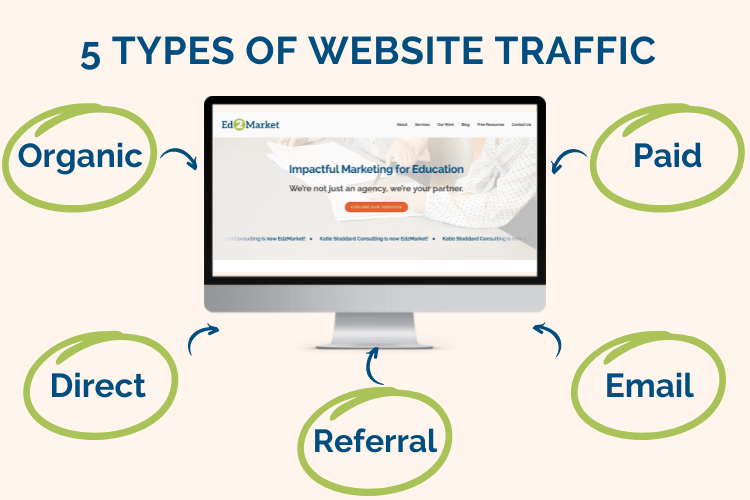
What Are The 5 Types of Website Traffic?
1. Organic Traffic
Organic traffic comes from unpaid search engine results when users find your site by typing in relevant queries on platforms like Google or Bing. To increase this type of traffic, focus on optimizing your site’s SEO—using targeted keywords, high-quality content, and proper site structure. Over time, ranking higher in search engine results pages can drive a steady stream of visitors who are genuinely interested in your products or services.
2. Direct Traffic
Direct traffic occurs when people visit your website by typing your URL directly into their browser or by clicking on a saved bookmark. This often reflects brand awareness, indicating that users already know your website address or have your site saved. Encouraging visitors to bookmark your pages or share your site name can bolster this metric, highlighting strong brand recognition and customer loyalty.
3. Referral Traffic
Referral traffic includes visitors who arrive on your site via links from external websites or content platforms. Building partnerships, guest posting, and earning mentions on authoritative sites can help grow this segment. High-quality referrals not only drive potential customers but can also improve your site’s credibility and SEO through valuable backlinks.
4. Paid Traffic
Paid traffic comes from online advertising campaigns—like Google Ads, social media ads, or display ads—designed to reach users quickly. This type of traffic is particularly useful for targeting specific demographics or promoting time-sensitive offers. Keeping a close eye on cost per click (CPC) and conversion rates ensures that paid traffic remains a profitable investment for your marketing strategy.
5. Email Traffic
Email traffic stems from visitors who click through links in your email newsletters, campaigns, or automated messages. A well-segmented email list and strong calls to action can boost clicks and conversions, turning prospects into loyal customers. Regularly refining your email content and delivery schedule can help maintain subscriber engagement and drive ongoing, qualified traffic to your site.
Why Is It Important To Track Website Traffic?
Your website is your business’s digital storefront. It’s the first point of contact for many potential customers; hence, tracking its traffic can provide valuable insights. However, to do so, it’s critical to identify your target audience clearly. Recognizing your audience’s demographics can help you tailor your website’s content, design, and marketing strategies to their preferences, leading to increased web traffic.

How Can I Measure My Website Traffic?
Understanding the different types of web traffic data is essential for crafting data-driven strategies that boost your website’s performance and user engagement. By analyzing web traffic with a broad range of metrics, you can uncover how visitors find your site, how they interact with your content, and what motivates them to convert.
Each tool and metric—from Google Analytics to heatmaps—offers unique insights that help you optimize your digital marketing campaigns, refine your user experience, and track important outcomes like conversions and bounce rates.
Google Analytics
Google Analytics is one of the most comprehensive website analytics tools available for tracking user behavior, traffic sources, and engagement patterns. It provides in-depth reporting on page views, bounce rates, and conversion rates, making it easier to pinpoint what content resonates with your audience. In addition to its robust real-time analytics, Google Analytics allows you to set up custom dashboards, segment users by demographics, and even track campaign effectiveness with UTM parameters.
Leadfeeder
Leadfeeder specializes in identifying B2B visitors by matching site traffic with company information, making it an excellent choice for businesses seeking qualified leads. With this platform, you can learn which organizations spend time on specific pages, giving you actionable steps to refine your lead generation strategy. By understanding the types of businesses that show interest in your products or services, you can tailor your outreach efforts more effectively and focus on building relationships that convert.
SimilarWeb
SimilarWeb offers a high-level overview of your website’s performance in relation to market competitors and industry benchmarks. It provides insights into your audience’s geographic distribution, traffic sources, and on-site behavior, helping you spot emerging trends and optimize for user intent. The platform also breaks down engagement metrics like page views per visit and average visit duration, which reveal how compelling your content is for different segments of your audience.
UTM Parameters
UTM parameters are tags you add to URLs to track specific marketing campaigns, content pieces, or promotional channels. By analyzing UTM parameters, you can determine which emails, social media posts, or ads generate the most valuable traffic, leading to better-allocated budgets and more effective marketing strategies. This granular data helps you connect user actions—such as downloads, sign-ups, or sales—to their exact source, allowing for precise optimization and reporting.
Read our UTM Parameters Guide to read to better understand Urchin Tracking Metrics.
What are the key metrics for tracking web traffic?
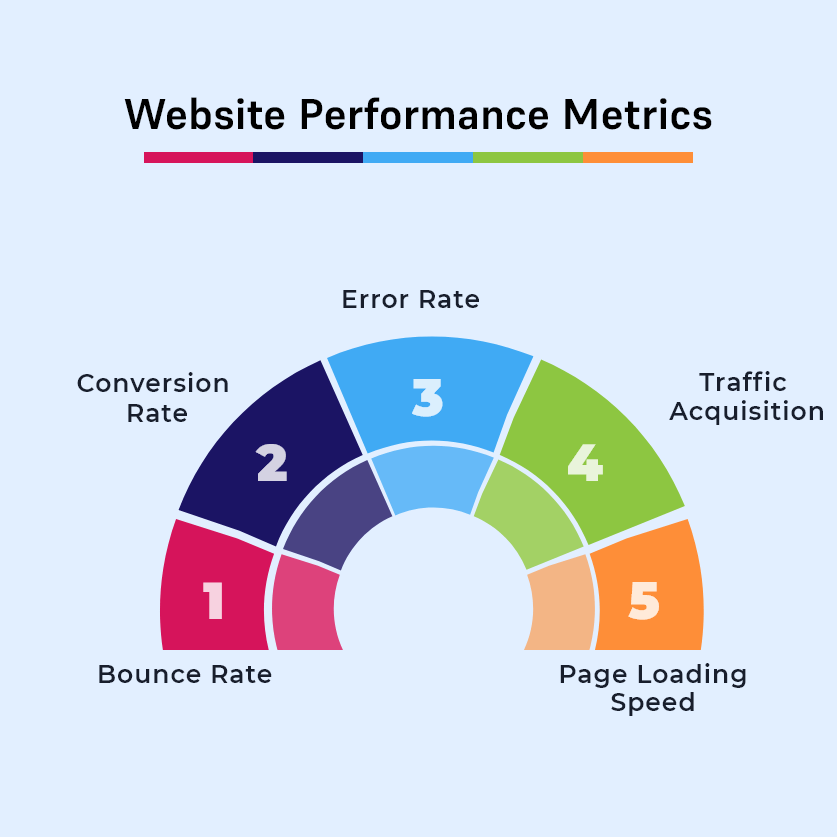
Tracking the right metrics is essential for assessing your site’s performance, understanding visitor behavior, and optimizing your digital marketing efforts. By focusing on measurements like page views, sessions, unique visitors, and various traffic sources, you gain a clearer picture of how users interact with your content and what drives them to convert.
Page Views
Page views represent the total number of times a page on your website is loaded or reloaded. This metric shows which pages attract the most interest and can help you identify high-performing content or underutilized opportunities. By comparing page views over time or across different marketing campaigns, you can refine your content strategy to better meet audience needs.
Sessions
A session is a group of user interactions that take place on your website within a specific timeframe, typically 30 minutes of inactivity by default. By looking at session data, you can understand how long people spend on your site and which actions they perform during each visit. Monitoring sessions alongside other metrics, like bounce rate or conversion rates, can reveal patterns in user engagement and highlight ways to improve the on-site experience.
Unique Visitors
Unique visitors reflect the number of distinct individuals who come to your website, often identified by cookies or user IDs. Tracking unique visitors helps gauge the reach and growth of your audience, letting you see if new marketing efforts are attracting first-time users. In combination with other metrics, unique visitor data gives you a fuller picture of how many fresh eyes are actually discovering your content.
Bounce Rate
Bounce rate measures the percentage of users who leave your site after viewing only one page. A high bounce rate may indicate issues like slow load times, irrelevant landing pages, or confusing navigation that discourages visitors from exploring further. Keeping tabs on this metric can help you pinpoint problems and refine your content or design to retain users for longer periods.
Engagement Rate
Engagement rate goes beyond simple visits by examining how actively users interact with your site, such as clicking links, commenting, or sharing content. This metric can be calculated in various ways, including combining time on page, scroll depth, and interactions with specific elements. Monitoring engagement rates allows you to gauge content effectiveness and fine-tune user experiences to encourage deeper involvement.
Mind Your Business Newsletter
Business news shouldn’t put you to sleep. Each week, we deliver the stories you actually need to know—served with a fresh, lively twist that keeps you on your toes. Stay informed, stay relevant, and see how industry insights can propel your bottom line.
Subscribe to Mind Your Business
Time Spent on Page
Time spent on page indicates how long users remain on a specific page before navigating away or leaving the site. Longer dwell times generally suggest more appealing, relevant, or informative content. By examining which pages hold user attention, you can replicate successful content strategies and pinpoint areas that could benefit from improvement.
Conversion Rates
Conversion rates reveal how effectively your website drives desired user actions, such as newsletter sign-ups, product purchases, or form submissions. By comparing conversion rates across different traffic sources or campaigns, you can determine where to focus your marketing spend and resources. This metric is crucial for assessing the ROI of your digital strategies and ensuring you meet your business objectives.
Traffic Sources
Traffic sources help you understand where your visitors originate—whether from search engines, social media, referral links, or direct visits. By identifying the channels that consistently bring in quality traffic, you can optimize your marketing budget and content for those platforms. Tracking traffic sources also lets you spot gaps or opportunities to diversify your outreach and expand your audience.
Organic Search Traffic
Organic search traffic stems from users finding your site through unpaid, natural search engine results. Monitoring this metric can unveil how effectively your SEO efforts, targeted keywords, and content structure are working. Analyzing your organic traffic helps you refine your search strategy and maintain a strong presence in relevant search queries.
Referral Traffic
Referral traffic occurs when users land on your website from external links on other sites, such as blogs, news outlets, or partner platforms. Observing referral traffic can highlight collaboration opportunities and pinpoint which partnerships drive the most impactful leads. This data also reveals where your brand is being mentioned, helping you cultivate relationships and potentially earn more backlinks.
Social Media Traffic
Social media traffic includes users who click through from platforms like Facebook, Twitter, LinkedIn, or Instagram. Evaluating social media traffic can confirm which channels resonate with your audience and foster meaningful engagements. By understanding which networks drive the most visitors, you can tailor content strategies to match platform-specific user behaviors.
The Limitations of Traffic Measurement Tools
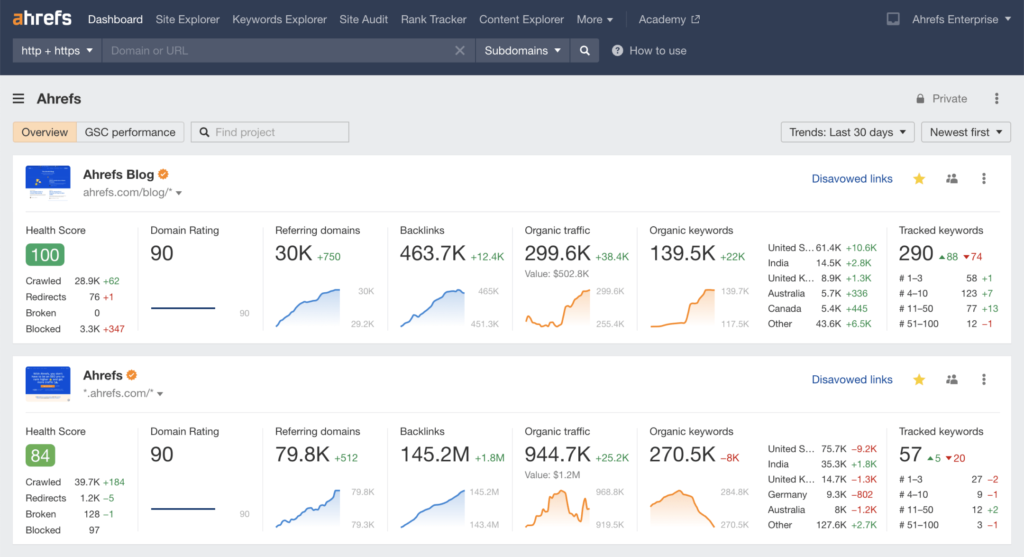
While traffic analytics solutions provide valuable insights, no tool is immune to inaccuracies or blind spots. Factors like user privacy settings, ad-blockers, and differing measurement methodologies can skew results or obscure key data points. By understanding these limitations, you can temper expectations and make more balanced decisions that account for potential gaps in reporting while analyzing website traffic.
Competitor Metrics
Competitive intelligence tools often rely on aggregated or sampled data, which may not precisely reflect a competitor’s exact traffic. These metrics can provide rough benchmarks, but variances in market size, industry, and seasonal trends can make comparisons unreliable. It’s best to view competitor metrics as directional indicators rather than ironclad facts.
JavaScript Enabled
Most analytics platforms depend on JavaScript to track user interactions, but if visitors disable JavaScript in their browsers, these platforms won’t record certain behaviors. This blind spot can cause inaccuracies in total session count or user engagement metrics. Although the percentage of users with JavaScript disabled is often small, it can still distort data for sites targeting specific tech-savvy audiences.
Ad-Blockers
Ad-blockers can hide tracking scripts or prevent them from loading, leading to underreported page views and unique visitors. This issue is particularly pronounced for websites frequented by privacy-conscious users who use multiple blocking tools. If a large segment of your audience uses ad-blockers, it’s crucial to explore alternative measurement methods, like server-side analytics, for more accurate results.
Cookies
Cookies help identify returning users and track user journeys, but visitors can clear or block them, making it harder to measure repeat visits accurately. Regulations like GDPR also require explicit permission for cookie usage, further affecting data collection. Inconsistent acceptance or deletion of cookies can lead to inflated unique visitor counts or missing return-visit data.
Desktop and Mobile Devices
Tracking user behavior across multiple devices can create reporting gaps if analytics tools can’t unify sessions under a single profile. A user who visits your site from both a smartphone and a desktop might be counted twice if device-level data isn’t consolidated. Cross-device tracking solutions exist, but they aren’t foolproof and can still leave holes in your understanding of the user journey.
Privacy Settings
Increased privacy controls in modern browsers—like Safari’s Intelligent Tracking Prevention (ITP) and Firefox’s Enhanced Tracking Protection—block or limit third-party cookies, making it tougher for analytics tools to track detailed user activities. As privacy awareness grows, more visitors adjust their settings to minimize data collection. While respecting privacy is essential, these measures can reduce the completeness of your analytics and require alternative tracking approaches.
Real-Time Measurement
Real-time analytics dashboards show near-instant data, but they can be prone to spikes or sudden dips that aren’t always reflective of long-term trends. Some platforms also sample or cache real-time data to preserve system performance, possibly delaying accurate updates. Relying exclusively on real-time figures can lead to hasty decisions; longer-term reports often offer more reliable perspectives.
Tracking Pixels
Tracking pixels embedded in emails, ads, or web pages can provide essential user data, but they too can be blocked by strict privacy settings or security software. Additionally, pixel-based data often relies on third-party services that may experience downtime or lag, creating discrepancies in reporting. Whenever tracking pixels are used, it’s wise to compare their results with other analytics sources to mitigate incomplete or inconsistent data.
How to Interpret and Act on Your Web Traffic Data
Collecting the right data is only half the battle—knowing how to analyze web traffic data and make informed improvements is what truly drives results. Below are practical steps and considerations for business owners to turn their web traffic metrics into actionable insights that enhance user experiences and boost conversions.
Assess High-Level Metrics
- Review overall traffic and trends: Look at total sessions, page views, and unique visitors to understand general site performance. If you see a spike or dip, investigate any recent marketing activities or site changes that might explain the fluctuation.
- Check bounce and engagement rates: A high bounce rate may signal irrelevant content or design flaws, while a healthy engagement rate suggests that visitors find your website valuable.
Segment Your Traffic Sources
- Identify top-performing channels: Compare organic search, social media, referral, and direct traffic to see which channels drive the most engaged visitors. If social media traffic spikes but yields low conversions, refine your content or target audience on that platform.
- Spot underperforming channels: If you notice low numbers from a specific source, adjust your marketing strategy or messaging for that audience. You might need a targeted ad campaign, improved SEO for certain keywords, or better partner outreach to attract higher-quality visitors.
Examine User Behavior in Detail
- Use heatmaps and session recordings: Tools like heatmaps help you see where users click and which sections get ignored. If important calls to action are placed too low on the page, consider moving them higher for better visibility.
- Monitor time on page and scroll depth: Long average times on page indicate engaging content; short durations or limited scrolling may mean your content needs to be more relevant or visually appealing.
Optimize for Conversions
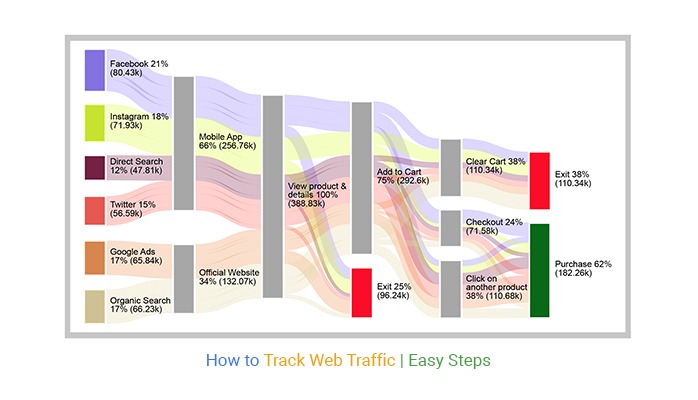
- Evaluate conversion funnel drop-offs: Use analytics to see where visitors exit during key steps, like filling out forms or adding items to a cart. If abandonment is high, test simpler forms, clearer instructions, or more prominent trust signals (like badges or testimonials).
- Refine calls to action (CTAs): Experiment with CTA placement, color, or wording to see which variations produce the highest click-through and conversion rates. Small adjustments can lead to significant improvements.
Track and Respond to Audience Demographics
- Personalize content and messaging: If your demographic data shows a younger audience than expected, adjust your language, imagery, or social media platforms to better resonate with them.
- Expand where you see potential: Notice a growing segment in an unexpected location or demographic? Tailor campaigns specifically to that audience or create localized landing pages for higher conversion rates.
Leverage Ongoing Testing and Analysis
- Run A/B tests regularly: Compare two versions of a page or CTA to see which one delivers better engagement or conversions. Continued testing leads to a deeper understanding of user preferences.
- Monitor changes over time: Set up monthly or quarterly reviews to see if your adjustments have improved metrics. Keep refining your tactics and pivot quickly if you notice negative trends.
You’ll transform raw metrics into meaningful strategies by consistently analyzing web traffic data and making data-driven changes. Over time, this continual cycle of analysis, action, and optimization can significantly boost visitor engagement, lead generation, and overall business growth.

Wrapping Up Analyzing Website Traffic (and How To Understand It!)
Measuring and analyzing web traffic isn’t just about crunching numbers—it’s about discovering how people engage with your brand and using that knowledge to guide every marketing move you make. From reviewing bounce rates to refining your conversion funnel, each step equips you with insights that lead to more meaningful interactions and stronger relationships with your customers.
As a passionate business owner, you’re juggling a thousand responsibilities, but with the right data, you can focus on the channels and strategies that truly drive results. This shift not only maximizes the value of every marketing dollar but also gives you the peace of mind that your website is working as hard as you do.
Take Action: Grab Our Website Traffic Checklist Now
If you’re ready to take the next step and ensure your traffic data translates directly into growth, grab our Website Traffic Checklist.
It’s a straightforward, actionable resource designed to help you confidently implement the insights you’ve just learned about analyzing web traffic. Imagine the relief of knowing exactly where your visitors come from, which content sparks their interest, and how to convert that interest into loyalty and sales. Your business deserves the attention of the right audience, and this checklist will guide you toward a future where every click counts—starting today.