Heading tags, also known as HTML headers or simply “headers“, are fundamental elements of HTML (Hypertext Markup Language) that define the structure and hierarchy of content on a webpage. These tags, ranging from <h1> to <h6>, are crucial for both organizing your content for readers and helping search engines understand the importance and relevance of different sections on your page.
In this comprehensive guide, we’ll explore the ins and outs of heading tags, their importance in web design and SEO, and how to use them effectively to improve your website’s performance and user experience.
Understanding the Basics of Heading Tags
Heading tags are essential building blocks of web content structure, providing a clear hierarchy for your information. Understanding how these tags work and their proper usage is crucial for creating well-organized, easily navigable web pages that appeal to users and search engines.
The Structure of Heading Tags
Heading tags in HTML have a simple structure:
<h1>Main Heading</h1>
<h2>Subheading</h2>
<h3>Sub-subheading</h3><h1>: This is the highest level heading, typically used for the main title of a page.<h2>to<h6>: These are used for subheadings, with the importance decreasing as the number increases.
Types of Heading Tags
- H1 Tag: The main heading of the page. There should generally be only one H1 tag per page.
Example:<h1>Complete Guide to SEO</h1> - H2 Tag: Major section headings.
Example:<h2>On-Page SEO Factors</h2> - H3-H6 Tags: Subsections and smaller divisions of content.
Example:
   <h3>Meta Descriptions</h3>
   <h4>Best Practices for Writing Meta Descriptions</h4>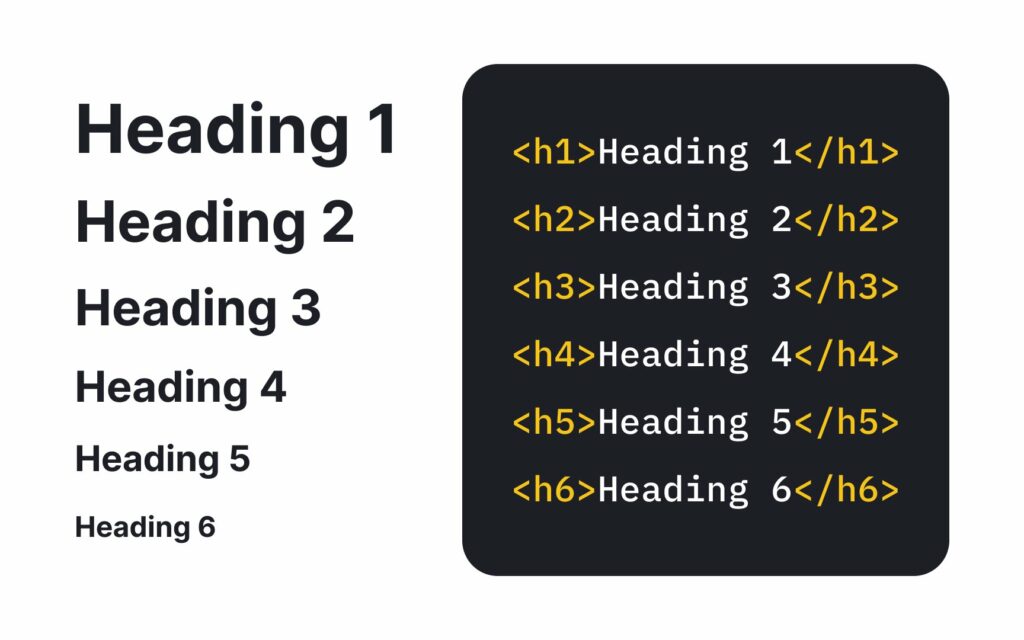
The SEO Impact of Heading Tags
Heading tags play a crucial role in search engine optimization, helping search engines understand your content’s structure and relevance. Properly using heading tags can significantly improve your small business’s website visibility in search results and enhance the user experience.
How Heading Tags Influence Search Engine Rankings
Heading tags play a significant role in SEO for several reasons:
- Content Structure: Search engines use heading tags to understand the structure and hierarchy of your content.
- Keyword Relevance: Including target keywords in your headings helps search engines determine the main topics of your page.
- User Experience: Well-structured content with clear headings improves readability, which can lead to better user engagement – a factor that search engines consider in rankings.
Best Practices for Using Heading Tags in SEO
- Use H1 for Main Title: Your H1 tag should contain your primary keyword and accurately describe the page’s content.
Good:<h1>Complete Guide to On-Page SEO</h1>
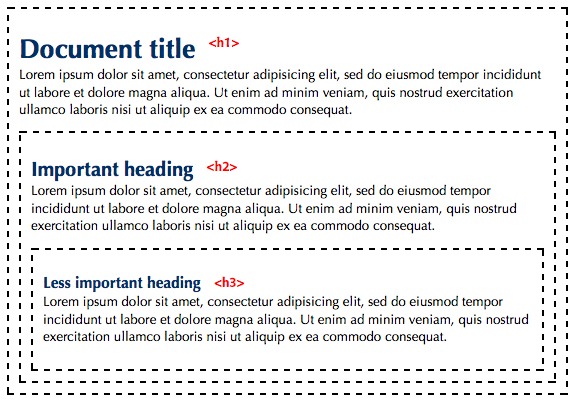
Avoid:<h1>Welcome to Our Website</h1> - Maintain Hierarchy: Use H2 tags for main sections, H3 tags for subsections, and so on. Don’t skip levels (e.g., from H2 to H4).
- Include Keywords Naturally: Incorporate relevant keywords in your headings, but avoid keyword stuffing.
- Keep Headings Concise: Aim for clear, descriptive headings that are easy to read and understand.
- Use Only One H1: In most cases, use only one H1 tag per page, typically for the main title.
Best Practices for Heading Tags in Web Design
Effective use of heading tags is not just about SEO; it’s also a crucial aspect of good web design and user experience. Properly structured headings help users navigate your content easily and understand the relationships between different page sections.
Enhancing User Experience with Heading Tags
- Create Clear Content Structure: Use heading tags to organize your content logically, making it easy for users to scan and understand.
- Ensure Consistency: Maintain a consistent style for your headings across your website.
- Use Descriptive Headings: Write headings that clearly indicate the content of the following section.
- Consider Accessibility: Proper use of heading tags helps users with screen readers navigate your content more easily.
Common Mistakes to Avoid
- Overusing H1 Tags: Using multiple H1 tags on a single page can confuse both users and search engines.
- Skipping Heading Levels: Jumping from H1 to H3 without using H2 disrupts the content hierarchy.
- Using Headings for Styling: Avoid using heading tags purely for their visual appearance. Use CSS for styling instead.
- Neglecting Lower-Level Headings: Don’t forget to use H4, H5, and H6 tags for deeper content structuring when necessary.
How to Audit and Optimize Existing Heading Tags
Regularly auditing and optimizing your heading tags is essential for maintaining strong small business SEO and user experience on your website. By following a systematic approach, you can identify areas for improvement and ensure your heading structure aligns with Google’s best practices.
Tools for Auditing Heading Tags
- Google Search Console: Use the “HTML Improvements” report to identify potential issues with your heading tags.
- SEMrush: Offers tools for analyzing your site’s heading structure and identifying optimization opportunities.
- Screaming Frog: A website crawler that can help identify issues with heading tags across your site.
Steps to Optimize Heading Tags for Better SEO
Conduct a Heading Tag Review:
- Analyze your current heading structure for consistency and relevance.
- Identify opportunities to improve keyword usage without over-optimizing.
Improve Heading Hierarchy:
- Ensure each page has a single, descriptive H1 tag.
- Use H2 tags for main sections and H3-H6 tags for subsections as needed.
Optimize Heading Content:
Mind Your Business Newsletter
Business news shouldn’t put you to sleep. Each week, we deliver the stories you actually need to know—served with a fresh, lively twist that keeps you on your toes. Stay informed, stay relevant, and see how industry insights can propel your bottom line.
Subscribe to Mind Your Business
- Update generic headings to be more descriptive and relevant.
- Incorporate important keywords naturally into your headings.
- Ensure Consistency: Check that your heading structure is consistent across all pages of your website.
- Address Accessibility: Verify that your heading structure makes sense when read without visual cues.
Frequently Asked Questions about Heading Tags
Understanding heading tags can sometimes be confusing, especially for those new to web design or SEO. This section addresses some of the most common questions about heading tags to help clarify their use and importance.
How Many H1 Tags Should a Page Have?
In most cases, a page should have only one H1 tag. This tag should represent the main topic or title of the page. Having multiple H1 tags can confuse search engines and users about the primary focus of your content.
Best Practice: Use a single, descriptive H1 tag that accurately summarizes the page’s content and includes your primary keyword.
How Do Heading Tags Affect SEO?
Heading tags significantly impact SEO for small businesses in several ways:
- They help search engines understand your content’s structure and main topics.
- They provide opportunities to include relevant keywords in prominent positions.
- They improve user experience by making content more scannable, potentially increasing time on page and reducing bounce rates.
Tip: While heading tags are important for SEO, always prioritize user experience when crafting your headings. Write for your audience first and optimize for search engines second.
Conclusion
Heading tags are essential elements of HTML that play a crucial role in both user experience and SEO. By understanding how to use them effectively, you can improve your website’s content structure, boost its search engine visibility, and provide a better experience for your users.
Remember these key points:
- Use a single, descriptive H1 tag for your main title
- Create a logical hierarchy with H2-H6 tags
- Include relevant keywords in your headings naturally
- Regularly audit and optimize your heading structure
Implementing these strategies can help you harness the full power of heading tags to enhance your website’s performance and achieve your online goals.
We encourage you to thoroughly audit your website’s heading tags and implement the optimization strategies discussed in this guide. You can significantly improve your site’s usability and search engine rankings with consistent effort and attention to detail.